
£20.63
On Hold
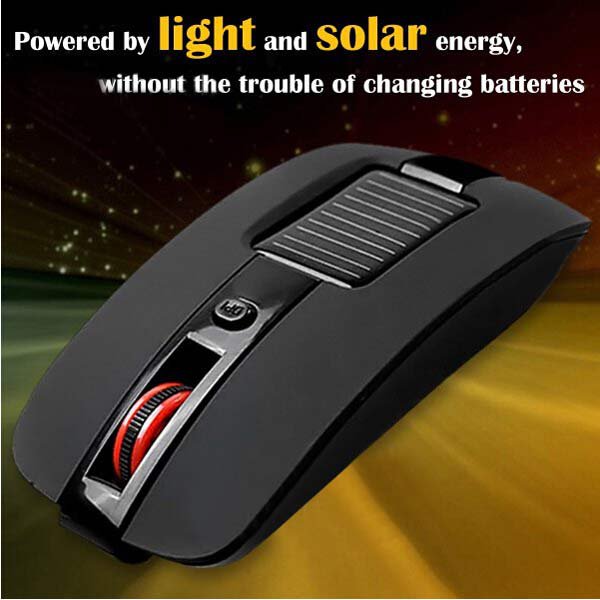
Multi-function 4 Keys Solar Energy 2.4GHz Wireless Optical Mouse
More than 10 available
Details
Shipping: United Kingdom: free (more destinations)
Condition: Brand new
*The store has not been updated recently. You may want to contact the merchant to confirm the availability of the product.


Feature:
solar wireless mouse
High 2000dpi adjustable
Low energy consumption
2.4GHz wireless technology
Elegant style and comfortable
Long working distance up to 10 meters
Suitable for game enthusiasts, fashionable young, commercial office crowd, long time computer workers
Specification:
Brand:Very cattle
Wireless distance:10m
Optical Resolution:1000-1500-2000DPI.
Colors:Black ,White
Size:110*56*26mm
System support: Windows 2000, Windows 7, Windows XP, Windows Vista, Mac OS
Package Included:
1*Solar Mouse
1*Receiver
Stated: This paragraph in the dual mouse mode, when the solar energy is exhausted batteries can be fitted to continue to use, while the mouse can also be used to store electrical energy,
to be a solar energy storage batteries can also be removed using this mouse functions can absorb a variety of solar energy, for example: night light in the room.
The use of solar power in the mouse, the mouse when not try to turn off the switch, to avoid wastage of electricity storage
About the lights:
This mouse is characterized by a solar laser mouse, the mouse inside a special optical engine technology, so the use of the mouse when not in use or lights are not bright.
About using:
Received after the baby, the first at the bottom of the mouse to take out mini USB receiver connected to the computer's USB port,
it is best to leave the mouse relatively close location, such as desktop computers connected to the chassis on the front rather than
the back of the chassis, because the chassis behind the words will shield the mouse receiver functions, the notebook is like saying,
USB interface, the mouse itself from nearby. Then open the bottom of the mouse switch to the "ON" position, you can normally use,
but can also be adjusted according to personal preferences below the mouse wheel "DPI", respectively, 1000-1500-2000, every click, and then move the mouse will have a different speed. Regulate can normally use.
About charging:
Regardless of the mouse button at the bottom of the switch is "ON" or "OFF" can be normal charging, when the switch is in the "ON" when the mouse is charging side,
side discharge, and can use, do not worry about parents who call on mouse over, because the battery is 1100MA, the most intense time in the sun, one hour of electricity absorb up to 40-50MA,
within an hour if a third time is the power consumption values are probably using the mouse 2MA, not when one second to enter the auto sleep almost not power up.
And the switch is "OFF", the mouse only charge is not discharged, and can not be used. Recommend parents who do not use it to switch to "OFF".
solar wireless mouse
High 2000dpi adjustable
Low energy consumption
2.4GHz wireless technology
Elegant style and comfortable
Long working distance up to 10 meters
Suitable for game enthusiasts, fashionable young, commercial office crowd, long time computer workers
Specification:
Brand:Very cattle
Wireless distance:10m
Optical Resolution:1000-1500-2000DPI.
Colors:Black ,White
Size:110*56*26mm
System support: Windows 2000, Windows 7, Windows XP, Windows Vista, Mac OS
Package Included:
1*Solar Mouse
1*Receiver
Stated: This paragraph in the dual mouse mode, when the solar energy is exhausted batteries can be fitted to continue to use, while the mouse can also be used to store electrical energy,
to be a solar energy storage batteries can also be removed using this mouse functions can absorb a variety of solar energy, for example: night light in the room.
The use of solar power in the mouse, the mouse when not try to turn off the switch, to avoid wastage of electricity storage
About the lights:
This mouse is characterized by a solar laser mouse, the mouse inside a special optical engine technology, so the use of the mouse when not in use or lights are not bright.
About using:
Received after the baby, the first at the bottom of the mouse to take out mini USB receiver connected to the computer's USB port,
it is best to leave the mouse relatively close location, such as desktop computers connected to the chassis on the front rather than
the back of the chassis, because the chassis behind the words will shield the mouse receiver functions, the notebook is like saying,
USB interface, the mouse itself from nearby. Then open the bottom of the mouse switch to the "ON" position, you can normally use,
but can also be adjusted according to personal preferences below the mouse wheel "DPI", respectively, 1000-1500-2000, every click, and then move the mouse will have a different speed. Regulate can normally use.
About charging:
Regardless of the mouse button at the bottom of the switch is "ON" or "OFF" can be normal charging, when the switch is in the "ON" when the mouse is charging side,
side discharge, and can use, do not worry about parents who call on mouse over, because the battery is 1100MA, the most intense time in the sun, one hour of electricity absorb up to 40-50MA,
within an hour if a third time is the power consumption values are probably using the mouse 2MA, not when one second to enter the auto sleep almost not power up.
And the switch is "OFF", the mouse only charge is not discharged, and can not be used. Recommend parents who do not use it to switch to "OFF".
Other Products from badiroga54 (View All)
-
£19.16

-
£7.36
-
£10.31

-
£24.32
-
£18.42
-
£50.12
-
£19.90
-
£5.89
-
£6.63
-
£12.52


 TR, sakarya
