
£14.74
On Hold
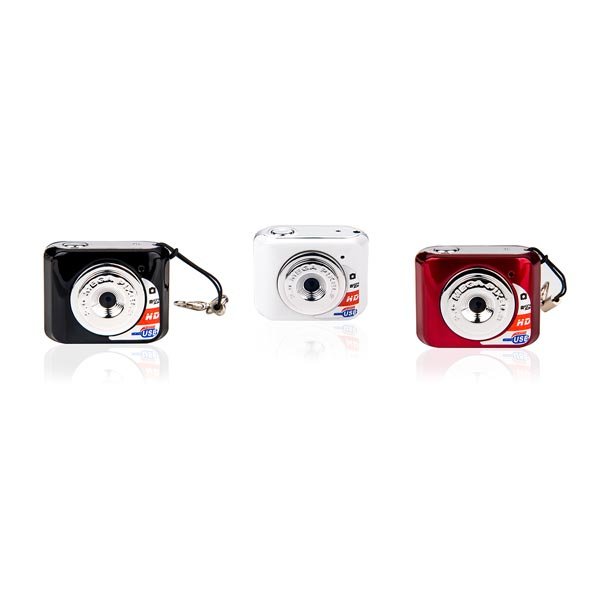
Mini DVR Camera Recorder Video Camera Mini Camcorder Sports DV/Camera
More than 10 available
Details
Shipping: United Kingdom: free (more destinations)
Condition: Brand new
*The store has not been updated recently. You may want to contact the merchant to confirm the availability of the product.


Description:
So Mini Camer! So lovely design for business, lawyers, reporters and other people to use. But also as a novel small gifts, small toys to gift.
Specification:
CPU A9-CORETEX kernel
Video decoding H. 263 accelerate
Video Format AVI
Video Code MPEG4
Video Resolution 640*480 or 720*480
Frame rate 30FPS
Software Operating system or the mainstream audio and video playback software
Picture Mode JPG
Picture Resolution 1280*720 or 1280*1024
System win7/2000/xp/2003/vista; Mac os 10.4; Linux
Recharge Voltage DC-5V
Data Transfer Interface Mini 8 Pin USB
Memory Card TF, Micro SD, Up to 32GB
Battery High capacity lithium polymer battery
Operation:
(1) ON/OFF
A. Turn On
Press the operation button for three seconds to turn on the equipment, The red indicator is burning. The equipment is in the standby mode now.
B. Turn Off
Press the operation button for five seconds,the red indicator is off.
(2) Take a Picture
A. The camera turns on in standby mode(If it is in the different mode,press the operation button to change it to standby mode)
B. Compose the picture.
C. Press the operation button completely down,the red indicator will flash one time.
(3) Take a Video
A. The camera turns on in standby mode(If it is in the different mode,press the operation button to change it to standby mode)
B. Press the operation button for three seconds,then release it.The red indicator will flash regularly.
C. To stop recording,press and release the operation button again(Press one seconds at this moment)
(4) Low Battery
If the equipment tests the voltage is too low to work. The equipment will be off after it saves the file and red indicator flashes five times.
(5) Recharge
A. Turn off the camera.
B. Connect Camera USB Cable and charger.
C. During Charging, the red indicator is blinking. When it is full, the red indicator is burning.
(6) Removable Disc
A. The camera turns off or turns on in the standby mode.
B. Connect camera USB Cable and Computer. The sign of removable disc will appear in my computer.
(7) Reset
A. Because of the wrong operation or unknown reason, the equipment can not work. Need to reset the equipment.
B. Press the reset hole with a slime tool.
(8) Change Time
A. Card under the root directory of the automatically create a file called time text documents.
B. Open time document, in strict accordance with the format of the accessories, write to the synchronization time.
Specific format as follows:
2009/07/22 the blank space key 12:00:00
C. Boot video, time writing machine.
(9) Pc Camera
In any mode on state, connecting a computer USB interface, and press the ON/OFF key in the U disk mode to enter the PC camera mode.
(10) Solve Camera Problems
A. Question: The red indicator flashes for five seconds, the equipment is off.
Answer:
Make sure the memory is enough or power is not in low battery.
If memory is full. Transfer pictures or videos to PC or insert another card.
If Low Battery,please recharge it.
B. Question:No answer from Camera
Answer:
Because of the wrong operation or unknown reason,the equipment can not work. Need to reset the equipment.
Press the reset hole with a slime tool.
Package Included:
1 x Mini DV (without memory card)
1 x USB Cable
1 x Hand Strip
1 x Manual
So Mini Camer! So lovely design for business, lawyers, reporters and other people to use. But also as a novel small gifts, small toys to gift.
Specification:
CPU A9-CORETEX kernel
Video decoding H. 263 accelerate
Video Format AVI
Video Code MPEG4
Video Resolution 640*480 or 720*480
Frame rate 30FPS
Software Operating system or the mainstream audio and video playback software
Picture Mode JPG
Picture Resolution 1280*720 or 1280*1024
System win7/2000/xp/2003/vista; Mac os 10.4; Linux
Recharge Voltage DC-5V
Data Transfer Interface Mini 8 Pin USB
Memory Card TF, Micro SD, Up to 32GB
Battery High capacity lithium polymer battery
Operation:
(1) ON/OFF
A. Turn On
Press the operation button for three seconds to turn on the equipment, The red indicator is burning. The equipment is in the standby mode now.
B. Turn Off
Press the operation button for five seconds,the red indicator is off.
(2) Take a Picture
A. The camera turns on in standby mode(If it is in the different mode,press the operation button to change it to standby mode)
B. Compose the picture.
C. Press the operation button completely down,the red indicator will flash one time.
(3) Take a Video
A. The camera turns on in standby mode(If it is in the different mode,press the operation button to change it to standby mode)
B. Press the operation button for three seconds,then release it.The red indicator will flash regularly.
C. To stop recording,press and release the operation button again(Press one seconds at this moment)
(4) Low Battery
If the equipment tests the voltage is too low to work. The equipment will be off after it saves the file and red indicator flashes five times.
(5) Recharge
A. Turn off the camera.
B. Connect Camera USB Cable and charger.
C. During Charging, the red indicator is blinking. When it is full, the red indicator is burning.
(6) Removable Disc
A. The camera turns off or turns on in the standby mode.
B. Connect camera USB Cable and Computer. The sign of removable disc will appear in my computer.
(7) Reset
A. Because of the wrong operation or unknown reason, the equipment can not work. Need to reset the equipment.
B. Press the reset hole with a slime tool.
(8) Change Time
A. Card under the root directory of the automatically create a file called time text documents.
B. Open time document, in strict accordance with the format of the accessories, write to the synchronization time.
Specific format as follows:
2009/07/22 the blank space key 12:00:00
C. Boot video, time writing machine.
(9) Pc Camera
In any mode on state, connecting a computer USB interface, and press the ON/OFF key in the U disk mode to enter the PC camera mode.
(10) Solve Camera Problems
A. Question: The red indicator flashes for five seconds, the equipment is off.
Answer:
Make sure the memory is enough or power is not in low battery.
If memory is full. Transfer pictures or videos to PC or insert another card.
If Low Battery,please recharge it.
B. Question:No answer from Camera
Answer:
Because of the wrong operation or unknown reason,the equipment can not work. Need to reset the equipment.
Press the reset hole with a slime tool.
Package Included:
1 x Mini DV (without memory card)
1 x USB Cable
1 x Hand Strip
1 x Manual
Other Products from badiroga54 (View All)
-
£11.79

-
£23.58

-
£25.79

-
£7.36

-
£17.68

-
£8.10
-
£41.27

-
£7.36

-
£8.10

-
£7.36


 TR, sakarya
