
£13.93
On Hold
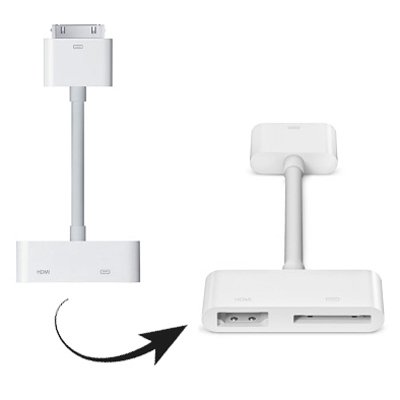
For iPad Digital AV HDMI Adapter to HDTV
9 available, 1 sold
Details
Shipping: United Kingdom: free (more destinations)
Condition: Brand new
*The store has not been updated recently. You may want to contact the merchant to confirm the availability of the product.
+ Free Worldwide Standard Shipping + Express delivery available +
IPAD2-0205 - Color available : As shown in pictures
Put your slides, movies, photos, and everything else that fills your iPad 2 screen on an even bigger screen — your HDTV. The Apple Digital AV Adapter mirrors exactly what you see on iPad 2 so that everyone in the room can enjoy it on your widescreen TV, video projection screen, or other HDMI-compatible display. The Apple Digital AV Adapter also supports video out for iPad, iPhone 4, or iPod touch (4th generation).
Overview:
1) Use the Apple Digital AV Adapter to mirror whatever’s on your iPad 2 screen — apps, presentations, websites, and more — on your HDTV or HDMI-compatible display in up to 1080p HD (movies play at up to 720p).
2) Watch slideshows and movies on the big screen in up to 720p by connecting your iPad, iPhone 4, or iPod touch (4th generation) to an HDTV or HDMI-compatible display.
3) The Apple Digital AV Adapter routes digital audio to screens that support it.
4) Connect the Apple Digital AV Adapter to your iPad , iPhone 4, or iPod touch (4th generation) via the 30-pin dock connector and to your HDMI-compatible display using an HDMI cable (sold separately).
5) A second 30-pin connector built into the AV adapter lets you charge and sync your device while it’s connected to your HDMI-compatible display
6) Compatible iOS 6.0-8.0 Version
Compatible with
Apple: New iPad , iPhone 4S , iPad 2 , iPod touch 4
If you need more details or picture, just mail us, thanks.
Product available within 2 to 4 business days, please refer to our shipping policies for delay or prefer the express delivery. Even if you are not from USA, you can choose Express delivery, just add item below to your cart and you will be delivered within 2 to 5 business days (after item is available for shipping) - Express delivery link is : http://goldydiscount.ecrater.com/p/22725070/express-delivery-option (Copy and paste, it will open a new window)
IPAD2-0205 - Color available : As shown in pictures
Put your slides, movies, photos, and everything else that fills your iPad 2 screen on an even bigger screen — your HDTV. The Apple Digital AV Adapter mirrors exactly what you see on iPad 2 so that everyone in the room can enjoy it on your widescreen TV, video projection screen, or other HDMI-compatible display. The Apple Digital AV Adapter also supports video out for iPad, iPhone 4, or iPod touch (4th generation).
Overview:
1) Use the Apple Digital AV Adapter to mirror whatever’s on your iPad 2 screen — apps, presentations, websites, and more — on your HDTV or HDMI-compatible display in up to 1080p HD (movies play at up to 720p).
2) Watch slideshows and movies on the big screen in up to 720p by connecting your iPad, iPhone 4, or iPod touch (4th generation) to an HDTV or HDMI-compatible display.
3) The Apple Digital AV Adapter routes digital audio to screens that support it.
4) Connect the Apple Digital AV Adapter to your iPad , iPhone 4, or iPod touch (4th generation) via the 30-pin dock connector and to your HDMI-compatible display using an HDMI cable (sold separately).
5) A second 30-pin connector built into the AV adapter lets you charge and sync your device while it’s connected to your HDMI-compatible display
6) Compatible iOS 6.0-8.0 Version
Compatible with
Apple: New iPad , iPhone 4S , iPad 2 , iPod touch 4
If you need more details or picture, just mail us, thanks.
Product available within 2 to 4 business days, please refer to our shipping policies for delay or prefer the express delivery. Even if you are not from USA, you can choose Express delivery, just add item below to your cart and you will be delivered within 2 to 5 business days (after item is available for shipping) - Express delivery link is : http://goldydiscount.ecrater.com/p/22725070/express-delivery-option (Copy and paste, it will open a new window)


