
£24.96
Add to Cart
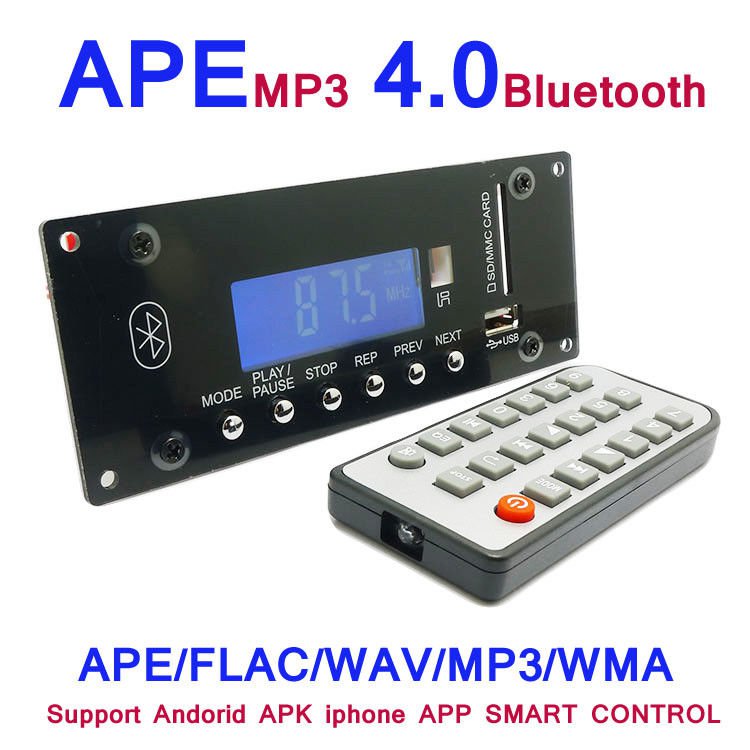
Wireless MP3 Decoding Board 4.0 Bluetooth Receiver Module Radio Remote Decoding
More than 10 available
Details
Shipping: United Kingdom: £1.00 (more destinations)
Condition: Brand new


Wireless MP3 Decoding Board 4.0 Bluetooth Receiver Module USB SD Radio APE FLAC WMA FM Remote Decoding Module Genuine Quality warranty ! Ship to worldwide via post air mail with tracking number. Also support english ! 1 support stereo Bluetooth speaker function, that is, the mobile phone and other devices can send music through the Bluetooth speaker (A2DP);2 supporting the speaker terminal to switch on the mobile phone and other devices through the Bluetooth control, adjust the volume, then the phone (AVRCP);3 Bluetooth Based on CLASS 2 power level, the use of Bluetooth 4 specification, compatible with Bluetooth 3 and the following version of the application, transmission speed can reach 3Mbit/s4 to support Card U and SD/MMC discs, music formats are: MP3, WMA, APE, FLAC, WAV (not licence);5 support FM, the frequency band is: 76MHZ~108MHZ;6 support AUX input is an external audio source through the AUX access and speakers can adjust the volume on the speaker;7 support the speaker status broadcast, can play a variety of sound box and can modify the language according to user needs;8 support function switch hotkey (a key in Card, AUX IN USB device/USB, U disk, FM card, Bluetooth, broadcast (MODE) key on the remote control function switch);9 support firmware encryption;10 support USB connection to PC for firmware upgrade / production;11 FAT16, FAT32, ExFAT/Fat64 file system support;12 support directory series: 8 sub directory;13 support file number: the number of files is not limited to a single directory, the total number of music files within 9999 can be supported;14 support SD/MMC/SDHC;15 support USB2.0, fully compatible with USB1.1;1632 stage volume (volume level can be configured),17 support the background of Bluetooth, in the case of Bluetooth connection can play card /U disk music and FM;18 support Spp remote control, that is, the phone after the installation of APK or APP can support the remote control function of the speaker.19 support for Bluetooth SIRI20- supports DAE virtual audio 20 PEQ audio compensation1 host keys- MODE: press this key to select the input USB > SD > BLUE > > FM. Long press onPREV key in the USB/SD/BT playing short press for the election on the song, long press to rewind (BT null); in radio FM state by choice of a short radio. Long press for backward search, search to the radio station.NEXT key in the USB/SD/BT playing short press to select the next song, long press to fast forward (BT effect) in the FM state radio radio short according to select the next. Long press forward search, search to the radio station.PLAY/PAUSE key - PLAY/PAUSE: in USB/SD/BT suspension. Enter the automatic station search in state radio short press this key long press invalid.The USB/SD ALL () - ONE (current folder loop) - > FOLDER (the current folder loop) - > NORMAL (cancel the cycle function, enter the order), the display is shown as follows (start by default all cycles), FM BT/ is invalid,Stop key: in the USB/ SD card status to stop playing, then press the play button from the first start playing. Other states are invalidThe main volume of the boot is the default maximum level of 15, no equipment for the Bluetooth state, there are devices (USB/SD also have the default USB) playback device content, USB/SD support after insertion priority, power down memory tracks / radio.2 remote control function:- POWER: standby (STANDBY) ON/OFF- MODE: press this key to select the input USB > SD > BLUE > FM > > LINE. In the FM and AUX status, press this key to enter the recording, the recording state is short press this key to enter the recording.PREV: in the USB/SD/BT playing short press for the election on the song, long press rewind (BT is invalid). In FM state, short press Select radio on a radio. Long press for backward search, search to the radio station. AUX state is invalid. NEXT: in the USB/SD/BT playing short press to select the next song, long press to fast forward (BT effect) in the FM state radio radio short according to select the next. Long press forward search, search to the radio station. AUX state is invalid.- VOL+: volume up- VOL-: volume decreases- USB/SD REP: ONE/ into play mode. It is ALL/RAN (the state of the USB/SD player is the default for ALL state. Then a short time to enter the ONE again into the RAN)- STOP: the status of the USB/ SD card is stopped, the other is not valid.- MUTE: all the state press the mute, and then press the mute.EQ: press this key to enter the sound field mode:. AE1, AE2, AE3, AE0 are four kinds of digital EQ, NORMAL (general) - > ROCK (Yao Gun)) - > CLASSIC (classical) > JAZZ (Jazz) > SOFT (Rou He), DBB (bass), POP Eq1 (Eq7).- PLAY/PAUSE: in the USB/SD/BT player status is suspended for a short time, and then at a time for playing. Enter the automatic station search in state radio press this button- 0 ~ 9: at USB/SD as a direct key. More than 10 songs can be selected to enter the number of consecutive. In the FM state, select the existing station. You can also press the digital key to enter the radio frequency to play the radio..Operating instructions:- boot instructionsWhen the power switch is turned on, the display is shown as follows:When USB is inserted, the first display device name is then displayed on the first few and then enters the play time. Show as follows:When the card is inserted into the first display device name and then display the first few then enter the play time. Show as follows:- USB operating instructions1, when the "USB" device to read, automatically play state. Play time of the first two representatives of the current playback, the last two representatives of the current player's second (full 60 seconds into a minute, the second is 00).2, in the "USB" state, short press panel or remote control of the "play / pause" button to enter the state, the system automatically mute. The display is suspended and the time is not fixed.3, in the "USB" state, press "0-9" on the remote control keys, can direct "USB" tracks, such as the selection of the first eighth, directly press the remote control 8; 25 first, continuous press the remote control of 2,5; 329, according to the continuousSelect 5 seconds after the digital key to automatically play the selected track. When the selected track exceeds the total track, the automatic playback device is playing a.5, in the "USB" state, according to the panel of the circular keys, short time into the ALL (all cycle) - ONE (single loop) - FOLDER (current folder loop) - NORMAL (cancel the cycle function, into the order of play), the display is as follows (on the default full cycle):6, in any state, according to the "EQ" button on the remote control, enter the field mode: AE1, AE2, AE3, AE0 are four kinds of digital EQ, NORMAL (general), ROCK (Yao Gun)), POP (POP), CLASSIC (classical), JAZZ (Jazz), SOFT (Rou He), and DBB (bass), Eq1 - Eq7 code display7, in the "USB" state, according to a panel or the "remote control" and "next" button, can select and loop selections (such as the first in a can to the last song), long press to rewind or fast forward.8, in the "USB" play state, according to the panel or remote control of the "stop" button, you can stop playing, press the play button from the first start to play9 according to the remote control of the volume and the key can adjust the volume, the corresponding volume of the corresponding series.- SD operating instructionsWith the USB operating instructions, but the USB symbol range of SD card symbols.- AUX operating instructions1, according to the panel or the remote control of the "MODE" button, switch to "AUX" state,2, in the "AUX" state, according to the panel's "play / pause" button or press the "mute" button, the system automatically mute.3, in the "AUX" state, press the volume key to adjust the volume- FM operating instructions (frequency range: 87.5 ~ 108MHz)1, according to the panel or remote control of the "MODE" button to switch to the FM state, the display will show the current device information "FM" and show the frequency of the last shutdown. The display is as follows:2, in the "FM" state, long press panel or remote control of the "play / pause" button, starting from the low-end to high-end automatic search platform, step into the 0.1MHZ, the frequency of continuous changes, search to the station after the automatic storage (display P**, said the station number) search for the first radio program.3, in the "FM" state, short press the panel or remote control of the "on a piece / next song" button, choose to have one or the next radio station; long press the back or forward search platform, search to the radio station, can also press the panel or remote control of the STOP key to save4, according to the remote control of the volume and subtract key, display the corresponding volume series..5, in the "FM" state, the remote control on the "0-9" button can direct digital radio or direct transmission to listen to radio frequency (1-50: No. 875-1080: Taiwan direct; direct frequency).- Bluetooth operating instructions- 1, according to the panel or the remote control of the "MODE" button, switch to the Bluetooth status, the screen will display the current state, no Bluetooth connection icon flashes; and mobile phone connection icon on. The display is as follows:L- in 2, Bluetooth, open the Bluetooth mobile phone, search equipment, equipment name (Bluetooth), mobile phone will be prompted to enter the PIN code, the password is "0000" (if the mobile phone supports simple pairing function, you do not need to enter the PIN code), after connection to listen to music. You can adjust the volume size with the volume of the remote control.- 3, if the device is closed or not resulting in a range of communication connection fails, you need to re search. Bluetooth disconnect will beep,- 4, Bluetooth playback can press panel or remote control on / under the song, play / pause control mobile phone player to do the operation,- 5, Bluetooth and mobile phone connection, in the conversion to
Other Products from vastboard (View All)
-
£30.90

-
£69.70

-
£49.18
-
£41.15
-
£41.69
-
£68.07

-
£89.18
-
£50.33

-
£41.69
-
£30.83


 CN, Guangdong
