
£33.02
Add to Cart
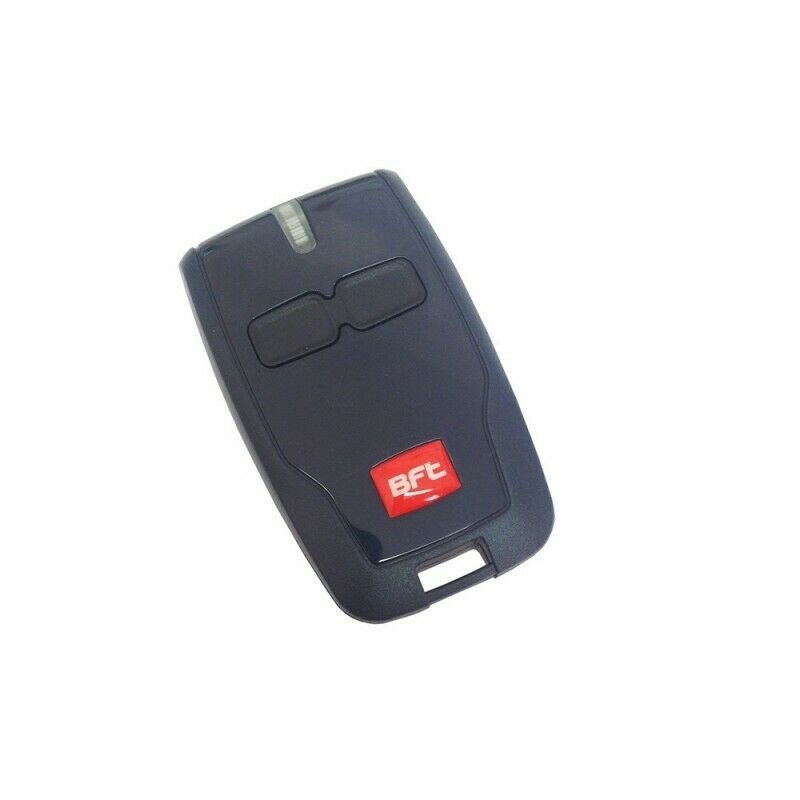
BFT MITTO 2 B2 Gate Garage Door Remote Control Key Fob
5 available
Details
Shipping: United Kingdom: free (more destinations)
Condition: Brand new
*The store has not been updated recently. You may want to contact the merchant to confirm the availability of the product.
Model: MITTO 2 B RCB Frequency: 433.92 MHz Number of buttons: 2 Power: Battery A23 12V Coding: rolling code Dimensions: Colour of the remote control: Colour of buttons: 80 mm × 38 mm × 18 mm blue blue Battery and instruction included How To Program your BFT Mitto? The following process will only work if your control panel has been enabled for remote programming by the installer. If the following process does not work, you will need the assistance of an approved BFT installer You must be at the control panel. (It does not need to be open) You will need one existing, functional, transmitter already coded on the system and any new/replacement transmitters readily to hand. The following sequence must be followed sequentially in rapid succession; any pause in the process will cause the system to time out. Read and familiarize yourself with the process before commencing. 1. Press the hidden button on the back of the transmitter already stored on the system for 2 seconds (If it has no hidden button use the top two front buttons together instead) Old type Mitto New type Mitto 2. Press the functioning button on the front of the transmitter already stored on the system for 2 seconds 3. Press the hidden button on the back of the new transmitter for 2 seconds (If it has no hidden button use the top two front buttons together instead) 4. Press the desired button on the front of the new transmitter for 2 seconds Repeat 3 & 4 for as many transmitters as are to be added to the system, but ensure there is no pause between operations to prevent time out 5. Leave 20 Seconds before attempting to use your new transmitter(s) for the board to reset Coding is now complete
Other Products from vairema (View All)
-
£44.27
-
£65.28
-
£69.04
-
£82.54

-
£36.77
-
£44.27

-
£300.16
-
£18.00

-
£247.63
-
£78.04


 LT, Lithuania
