
£9.75
Add to Cart
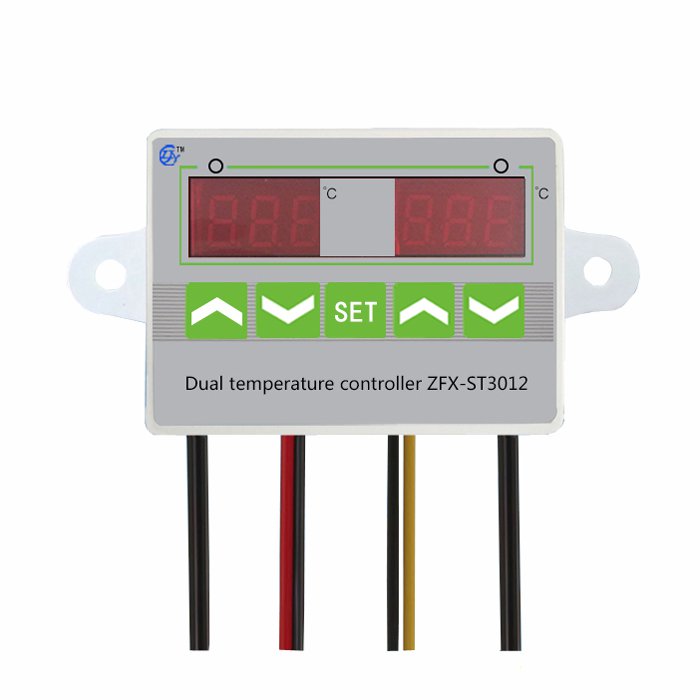
AC 110V-220V 12V 24V Digital LED Dual Thermometer Temperature Controller Thermostat Incubator
More than 10 available
Details
Shipping: United Kingdom: £2.00 (more destinations)
Condition: Brand new
*The store has not been updated recently. You may want to contact the merchant to confirm the availability of the product.


Features:
This is a dual display and dual control temperature controller, it can both control refrigeration or heating of two products, setting method is same of left and right.Temperature control range: -50в„ѓ~110в„ѓTemperature measurement error: ±0.5в„ѓSensor model: ntc(10K/3435)Control precision: DC12V/DC24V/AC220V(can be choose)Working current: MAX200MaRelay contact current: AC5A/ 110V-220V Working temperature: 0в„ѓ~50в„ѓStorage temperature: -10в„ѓ~60в„ѓMeter length: 90mm(L) x 60mm(W) x 26.5mm(H)Hole size: 70mm(L) x 50mm(H)lDistribution probe length is 1m, Probe size: Φ4mm x 20mm
Menu code description:
Menu codeSpecifyExplanationUnitHCRefrigeration/heatingThermostat working mode setH=Heating C=CoolingDReturn differenceTemperature difference between start up & shutdownв„ѓLSUltralow temperatureAL-Lв„ѓHSUltra-temperatureAL-Hв„ѓCATemperature correction в„ѓPTDelay startMinimum downtimeMInute
Wiring Diagram:
Instruction:
Set the left control temperaturePress the “SET”Key board and left screen flashes.Press “UP” and “ Down “key board to adjust temperature range,press right “UP” or “Down”key board (Any one) to preserve then exit.
Set the right control temperaturePress twice “SET”board and right screen flashes, Press”UP” and “Down”Key board to adjust temperature,press right “UP” and “Down”board(any one) to preserve then exit.
Start and stop timingUnder the state of standby electric to press the “SET” once, start timing output, screen alternately.Press the “SET” Key board three seconds enter into the setting of control parameters.Press в–Іor в–ј key board choose adjust menu. then press SET key board once again to enter into the related state of control parameter setting, press в–Іor в–ј key board to adjust parameters which requires modify. Press “SET” key board to exit after adjusted, or exited from delayed 6 seconds system.в—†Cooling heating mode setting.Press ”SET” key board less than 3 seconds, enter into menu display, the code “HC” is displaying on screen, press “set” key board displayed working mode.Press”в–І” or “в–ј”to adjust parameters. ”C” means cooling mode,”H” means heating mode.в—†Return difference function.Maximum temperature was restricted with return difference between start up and close down.в—†Return difference setting.Press ”SET” key board less than 3 seconds, enter into the menu display, press “в–І” or “в–ј” key board to adjust code until screen displayed “D” code, press “SET” keyboard to displayed value of return difference. Press the “в–І” and “в–ј” keyboard again to adjust parameters.
в—†Temperature correction functionWhen there has deviations between measurement temperature and standard temperature. Machine measurement value and standard temperature can adjust to same under function of temperature correction. Temperature after correction=Temperature before correction +value of correction (Value of correction can be positive number ,negative number and zero)в—†Temperature correction setting.Press ”SET” keyboard less than 3 seconds, enter into menu display, press “в–І” or “в–ј” keyboard to adjust code until screen displayed “CA”, press ”SET” keyboard display temperature correction value, Press the “в–І” and “в–ј” keyboard again to adjust parameters.в—†Delay protection function:Press ”SET” Keyboard less than 3 minutes. enter into the menu display . press “в–І” or “в–ј” keyboard to adjust code until screen displayed “PT”, Press “SET” keyboard displayed delay protection setting, Press the “в–І” and “в–ј”keyboard again to adjust parameters.в—†Ultra-temperature alarm functionIf measurement temperature ≥control temperature +AH alarm relay actuated, temperature controller alarming, display screen alternated displaying “H” and present temperature. Then press anyone keyboards to stop alarming and turn off alarm relay output. в—†Ultra-temperature alarm settingPress “SET” keyboard less than 3 seconds, enter into menu display, press “в–І” or “в–ј” keyboard to adjust code until screen displayed “HS”. Press ‘SET” keyboard displayed the set value of ultra-temperature, press “в–І” or “в–ј”keyboard again to adjust parameters, Set up “HS as “0”, you can turn off the alarm function.в—†Ultralow temperature alarm function.measurement temperature < control temperature-LS alarm relay actuated, temperature controller alerting. Display screen alternated displaying “L ”and present temperature, press anyone keyboard and turn off relay output.в—†Ultralow temperature alarm setting
This is a dual display and dual control temperature controller, it can both control refrigeration or heating of two products, setting method is same of left and right.Temperature control range: -50в„ѓ~110в„ѓTemperature measurement error: ±0.5в„ѓSensor model: ntc(10K/3435)Control precision: DC12V/DC24V/AC220V(can be choose)Working current: MAX200MaRelay contact current: AC5A/ 110V-220V Working temperature: 0в„ѓ~50в„ѓStorage temperature: -10в„ѓ~60в„ѓMeter length: 90mm(L) x 60mm(W) x 26.5mm(H)Hole size: 70mm(L) x 50mm(H)lDistribution probe length is 1m, Probe size: Φ4mm x 20mm
Menu code description:
Menu codeSpecifyExplanationUnitHCRefrigeration/heatingThermostat working mode setH=Heating C=CoolingDReturn differenceTemperature difference between start up & shutdownв„ѓLSUltralow temperatureAL-Lв„ѓHSUltra-temperatureAL-Hв„ѓCATemperature correction в„ѓPTDelay startMinimum downtimeMInute
Wiring Diagram:
Instruction:
Set the left control temperaturePress the “SET”Key board and left screen flashes.Press “UP” and “ Down “key board to adjust temperature range,press right “UP” or “Down”key board (Any one) to preserve then exit.
Set the right control temperaturePress twice “SET”board and right screen flashes, Press”UP” and “Down”Key board to adjust temperature,press right “UP” and “Down”board(any one) to preserve then exit.
Start and stop timingUnder the state of standby electric to press the “SET” once, start timing output, screen alternately.Press the “SET” Key board three seconds enter into the setting of control parameters.Press в–Іor в–ј key board choose adjust menu. then press SET key board once again to enter into the related state of control parameter setting, press в–Іor в–ј key board to adjust parameters which requires modify. Press “SET” key board to exit after adjusted, or exited from delayed 6 seconds system.в—†Cooling heating mode setting.Press ”SET” key board less than 3 seconds, enter into menu display, the code “HC” is displaying on screen, press “set” key board displayed working mode.Press”в–І” or “в–ј”to adjust parameters. ”C” means cooling mode,”H” means heating mode.в—†Return difference function.Maximum temperature was restricted with return difference between start up and close down.в—†Return difference setting.Press ”SET” key board less than 3 seconds, enter into the menu display, press “в–І” or “в–ј” key board to adjust code until screen displayed “D” code, press “SET” keyboard to displayed value of return difference. Press the “в–І” and “в–ј” keyboard again to adjust parameters.
в—†Temperature correction functionWhen there has deviations between measurement temperature and standard temperature. Machine measurement value and standard temperature can adjust to same under function of temperature correction. Temperature after correction=Temperature before correction +value of correction (Value of correction can be positive number ,negative number and zero)в—†Temperature correction setting.Press ”SET” keyboard less than 3 seconds, enter into menu display, press “в–І” or “в–ј” keyboard to adjust code until screen displayed “CA”, press ”SET” keyboard display temperature correction value, Press the “в–І” and “в–ј” keyboard again to adjust parameters.в—†Delay protection function:Press ”SET” Keyboard less than 3 minutes. enter into the menu display . press “в–І” or “в–ј” keyboard to adjust code until screen displayed “PT”, Press “SET” keyboard displayed delay protection setting, Press the “в–І” and “в–ј”keyboard again to adjust parameters.в—†Ultra-temperature alarm functionIf measurement temperature ≥control temperature +AH alarm relay actuated, temperature controller alarming, display screen alternated displaying “H” and present temperature. Then press anyone keyboards to stop alarming and turn off alarm relay output. в—†Ultra-temperature alarm settingPress “SET” keyboard less than 3 seconds, enter into menu display, press “в–І” or “в–ј” keyboard to adjust code until screen displayed “HS”. Press ‘SET” keyboard displayed the set value of ultra-temperature, press “в–І” or “в–ј”keyboard again to adjust parameters, Set up “HS as “0”, you can turn off the alarm function.в—†Ultralow temperature alarm function.measurement temperature < control temperature-LS alarm relay actuated, temperature controller alerting. Display screen alternated displaying “L ”and present temperature, press anyone keyboard and turn off relay output.в—†Ultralow temperature alarm setting
You may also be interested in:
-
£15.00
-
£11.99
-
£20.25

-
£22.50
-
£18.75
-
£15.00

-
£52.53

-
£788.12

-
£52.53

-
£600.47



 CN, Jiangsu Sheng
