£220.02
Add to Cart
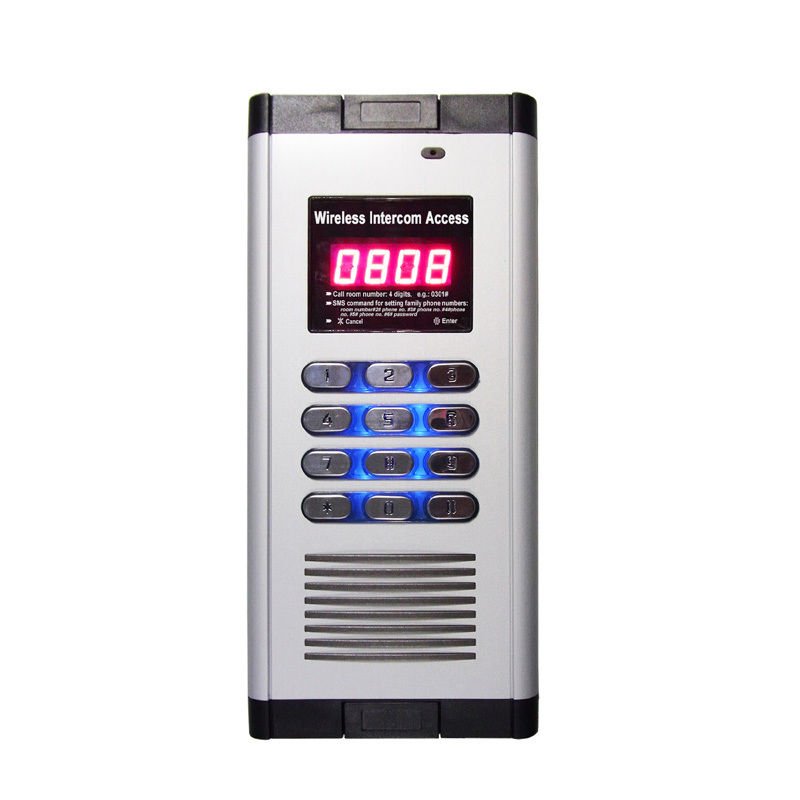
2-Relay Quad-band Intercom GSM Residential Gate Access Entry Apartment 1000 User
More than 10 available
Details
Shipping: United Kingdom: free (more destinations)
Sales Tax: check
Condition: Brand new
Returns: 30 days, buyer pays return shipping (more)
*The store has not been updated recently. You may want to contact the merchant to confirm the availability of the product.
Android/Iphone Remote Control WIFI Video Doorbell Fingerprint IP Intercom Home Door Access Control System
Introduction
This product is an intercom Access + GSM Door Opener
Open the door not only by keyboard and card, but also by a free call .
What's more, use cellphone to open the door, no need to install extension Building intercom in every house.
Save a lot of cost and trouble to install any extension intercom access device.
Save a lot in maintenance cost of each extension device.
Specification
Quad-band 850/900/1800/1900Mhz;
FREE Charge. Open the Door By Auto-rejected Phone Calls By Authorized Numbers
High Quality Two-way Voice Communication, and optional audio
Every Family has an Admin Password and Authorize 5 Family Phone Numbers
Up to 200 families, total 1000 authorized phone numbers, Special for Apartments and Residential buildings
Affordable Rates with Top Quality. No More Wiring Installations and other Complex Accessories
2 Relay Outputs (NC/NO), Well compatible with Electronic Locks and DVR Camera
12VDC Power Supply, Relay Time Editable (1-300 seconds). Default“0s”, means not work
Can be set up by send Message, also by software on computer (recommended way)
200A control two doors together
Setting:
1) Open the unit's back cover and insert the SIM card.(B1, B2).
2) Reset the device:
Short contact the“R” and”G” in“J4” by the jumper ( C2),
Power on the device
After 3 seconds, pull out the jumper and removed it to”J69”(C1).
The device will be reset to the default setting, all the authorized number will be removed.
3) Wiring connect refer to the picture (D1). Then switch on the device, LED displays .
4) When the SIM card working normally, LED screen displays
Basic Operation:
Administrator:
1) By Keyboard : Enter the "Family door operate password #"or "Administrator password#" to open the door, if open successfully, will be
2) By phone call, the device will open the door and rejected the call, . means successful
Guests:
1) In the standard interface
2) Enter the "Room number#" E.g:"0101#"→ →High quality Two-ways voice communication.
Introduction
This product is an intercom Access + GSM Door Opener
Open the door not only by keyboard and card, but also by a free call .
What's more, use cellphone to open the door, no need to install extension Building intercom in every house.
Save a lot of cost and trouble to install any extension intercom access device.
Save a lot in maintenance cost of each extension device.
Specification
Quad-band 850/900/1800/1900Mhz;
FREE Charge. Open the Door By Auto-rejected Phone Calls By Authorized Numbers
High Quality Two-way Voice Communication, and optional audio
Every Family has an Admin Password and Authorize 5 Family Phone Numbers
Up to 200 families, total 1000 authorized phone numbers, Special for Apartments and Residential buildings
Affordable Rates with Top Quality. No More Wiring Installations and other Complex Accessories
2 Relay Outputs (NC/NO), Well compatible with Electronic Locks and DVR Camera
12VDC Power Supply, Relay Time Editable (1-300 seconds). Default“0s”, means not work
Can be set up by send Message, also by software on computer (recommended way)
200A control two doors together
Setting:
1) Open the unit's back cover and insert the SIM card.(B1, B2).
2) Reset the device:
Short contact the“R” and”G” in“J4” by the jumper ( C2),
Power on the device
After 3 seconds, pull out the jumper and removed it to”J69”(C1).
The device will be reset to the default setting, all the authorized number will be removed.
3) Wiring connect refer to the picture (D1). Then switch on the device, LED displays .
4) When the SIM card working normally, LED screen displays
Basic Operation:
Administrator:
1) By Keyboard : Enter the "Family door operate password #"or "Administrator password#" to open the door, if open successfully, will be
2) By phone call, the device will open the door and rejected the call, . means successful
Guests:
1) In the standard interface
2) Enter the "Room number#" E.g:"0101#"→ →High quality Two-ways voice communication.
Other Products from gate-hardware-and-equipments (View All)
-
£456.81
-
£208.45
-
£1,435.76
-
£648.62

-
£167.79

-
£21.58

-
£463.36
-
£439.27
-
£417.27

-
£601.78