£11.81
Add to Cart
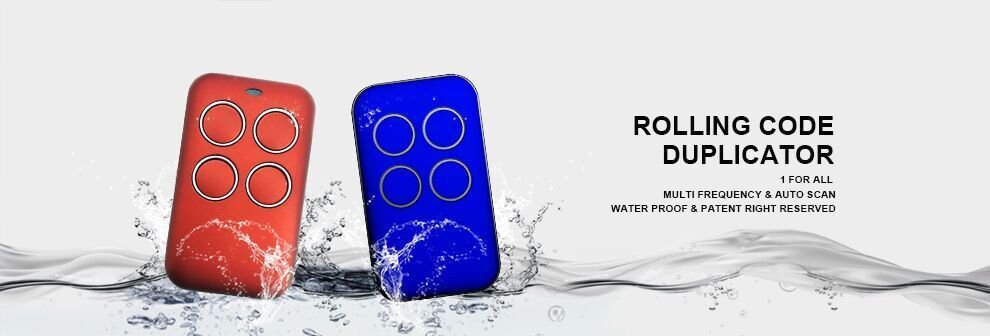
Multi Frequency Rolling Code Remote Control Genius Echo TX4 RC Amigo Kilo 433.92
More than 10 available
Details
Shipping: United Kingdom: free (more destinations)
Sales Tax: check
Condition: Brand new
Returns: 30 days, buyer pays return shipping (more)
*The store has not been updated recently. You may want to contact the merchant to confirm the availability of the product.


IF YOU NEED AN SPECIFIC COLOR LEAVE US A MESSAGE, WE HAVE (RED, BLACK, BLUE, GREEN)
Features:
Duplicating procedures:
Check below list at the bottom for detailed compatibility (BFT, Beninca, Liftmaster, Chamberlain, Sears Craftsman, Lockmaster, Viking, Powermaster, Haudini, Viper, Cylcone, NSEE, Linear, Multicode, GTO, Mighty Mule and many more)
Compatible with overhead operators and garage doors
Manual included
Part 1:Fixed code duplicating procedures
1. Press & hold button 1 of the duplicator, meanwhile press 4 times the 2 button.
2. Release both buttons. Now the RED LED emits a short flash every 2 seconds.
3. Place the original remote control next to duplicator around 5cm
4. Keep pressing the button of the original remote control and wait for a change flash (as a faster flash) of duplicator RED LED and a change of its color (BLUE) that confirms the correct learning of code. This step may take a few seconds and during that the color LED is WHITE.
5. While the BLUE LED is flashing, press the button of the duplicator where you want to program the code just learnt, and retain pressed until the LED switches off and an extended sound “BEEP” for a reconfirmation of the correct code learning.
This step may take some seconds.
6. The copy has been happened with success. Repeat the duplication from step 1 to the rest buttons.
Part 2:Rolling code (Simple code) duplicating procedures
1. Press & hold button 1 of the duplicator, meanwhile press 4 times the 2 button.
2. Release both buttons. Now the duplicator RED LED will emit a short flash every 2 seconds.
3. Place the original remote control next to duplicator around 5cm
4. Keep pressing the button of the original remote control and wait for a change flash (as a faster flash) of duplicator RED LED and a change of its color (BLUE) that confirms the correct learning of code. This step may take a few seconds and during that the color LED is WHITE.
5. While the BLUE LED is flashing, press the button of the “duplicator” where you want to program the code just learnt, and retain pressed until the LED will switch off. The duplicator remote control will emit an extended sound “BEEP” for are confirmation of the correct code learning.
6. Repeat the duplication from step 1 to the rest buttons.
7. Activate now the correct procedure for the programmed model and insert the new remote control on the receiver (seethe compatibility list present in this manual).
Part 3:Rolling code (Complex code) duplicating procedures
3.1 BFT
1. Press & hold button 1 of the duplicator,meanwhile press 4 times the 2 button.
2. Release both buttons. Now the duplicator RED LED will emit a short flash every 2 seconds.
3. Place the original remote control next to duplicator around 5cm
4. Keep pressing the button to be programmed of the original remote control, till the RED LED will switch on as a fix light; now release the button.
5. The duplicator RED LED will emit a short flash every 2 seconds supported by two following sound “BEEP”. These two alerts indicates it is necessary to emit the SEED CODE to realize the copy.
6. To transmit the SEED CODE of the BFT original remote control, please using a pin, press the rear hide button (see the picture)or, according to the new references, press the 1 and 2 buttons until the original remote control LED switches on.
7. Now the duplicator RED LED will change the flash mode (more fast) and color (BLUE), for a reconfirmation of the correct code learning. This step may take some seconds.
8. At this moment, press the duplicator button when you want to store the code and retain pressed until the duplicator BLUE LED switches off and an extended sound “BEEP” is emitted for a reconfirmation of the correct code learning. Repeat the duplicationg from Step 1 to the rest buttons.
9. Activate now the DOR procedure to insert the new remote control on the receiver.
1. Press & hold button 1 of the duplicator,meanwhile press 4 times the 2 button.
2. Release both buttons. Now the duplicator RED LED will emit a short flash every 2 seconds.
3. Place the original remote control next to duplicator around 5cm
4. Keep pressing the button to be programmed of the original remote control, till the RED LED will switch on as a fix light; now release the button.
5. The duplicator RED LED will emit a short flash every 2 seconds supported by two following sound “BEEP”. These two alerts indicates it is necessary to emit the SEED CODE to realize the copy.
6. To transmit the SEED CODE of the V2 original remote control, please press at the same time 1 and 2 buttons.
7. Now the duplicator RED LED will change the flash mode (more fast) and color (BLUE), for a reconfirmation of the correct code learning. This step may take some seconds.
8. At this moment, press the duplicator button when you want to store the code and retain pressed until the duplicator BLUE LED switches off and an extended sound “BEEP” is emitted for a reconfirmation of the correct code learning. Repeat the duplicationg from Step 1 to the rest buttons.
9. Activate now DOR the procedure to insert the new remote control on the receiver.
3.3:FAAC 433 - 868
Attention: verify the programming remote control is a MASTER. Pressing whatever button, the LED has to emit a double flash rather than to switch on as a fixed light.
1. Press & hold button 1 of the duplicator,meanwhile press 4 times the 2 button.
2. Release both buttons. Now the duplicator RED LED will emit a short flash every 2 seconds.
3. Place the original remote control next to duplicator around 5cm
4. Keep pressing the button to be programmed of the original remote control, till the RED LED will switch onas a fix light; now release the button.
5. The duplicator RED LED will emit a short flash every 2 seconds supported by two following sound “BEEP”. These twoalerts indicates it is necessary to emit the SEED CODE to realize the copy
6. Predispose the FAAC/GENIUS remote control for the SEED CODE emission. Press at the same time the 1 and 2 buttons(note: THESE ARE THE BUTTONS OF THE DIAGONAL LINE).
7. While FAAC/GENIUS remote control LED flashes, place it in front of duplicator at a distance of 5cm and press thebutton to be programmed until the duplicator RED LED will change the flash mode (more fast) and color (BLUE), for areconfirmation of the correct code learning. This step may take some seconds..
8. At this moment, press the button when you want to store the code and retain pressed until the duplicator BLUE LED,switches off and an extended sound “BEEP” is emitted to confirm the correct learning of the code. Repeat the duplicationg from Step 1 to the rest buttons.
9. The copy has been happened with success. Now check on the automation the correct functioning of new duplicatorremote control pressing two times the copied button.
Part 4:Source duplicator to new duplicator duplicating procedures
1. Press & hold button 1 of the NEW duplicator,meanwhile press 4 times the 2 button.
2. Release both buttons. Now the RED LED of “NEW duplicator” will emit a short flash every 2 seconds.
Place the “SOURCE duplicator” in front of the “NEW duplicator
around 5cm
4. Keep pressing the button to be programmed of the “SOURCE duplicator”
IS A FIXED OR ROLLING-SIMPLE CODE
5a wait for a change flash (as a faster flash) of “NEWduplicator” RED LED and a change of its color (BLUE)that confirms the correct learning of code. This operationmay take some seconds.
6a While the BLUE LED is flashing, press the button ofthe “NEW duplicator” where you want to program thecode just learnt, and retain pressed until the LED willswitch off and an extended sound “BEEP” is emitted for areconfirmation of the correct code learning.
7a The copy has been happened with success. Now checkon the automation the correct functioning of NEW duplicator remote control pressing directly the button wherethe code has been programmed. If it will not work, pleaseproceed with the insertion on the receiver of the NEWduplicator, through the function, if it is present,or through the procedures given by the automation manufacturer.
Features:
Duplicating procedures:
Check below list at the bottom for detailed compatibility (BFT, Beninca, Liftmaster, Chamberlain, Sears Craftsman, Lockmaster, Viking, Powermaster, Haudini, Viper, Cylcone, NSEE, Linear, Multicode, GTO, Mighty Mule and many more)
Compatible with overhead operators and garage doors
Manual included
Part 1:Fixed code duplicating procedures
1. Press & hold button 1 of the duplicator, meanwhile press 4 times the 2 button.
2. Release both buttons. Now the RED LED emits a short flash every 2 seconds.
3. Place the original remote control next to duplicator around 5cm
4. Keep pressing the button of the original remote control and wait for a change flash (as a faster flash) of duplicator RED LED and a change of its color (BLUE) that confirms the correct learning of code. This step may take a few seconds and during that the color LED is WHITE.
5. While the BLUE LED is flashing, press the button of the duplicator where you want to program the code just learnt, and retain pressed until the LED switches off and an extended sound “BEEP” for a reconfirmation of the correct code learning.
This step may take some seconds.
6. The copy has been happened with success. Repeat the duplication from step 1 to the rest buttons.
Part 2:Rolling code (Simple code) duplicating procedures
1. Press & hold button 1 of the duplicator, meanwhile press 4 times the 2 button.
2. Release both buttons. Now the duplicator RED LED will emit a short flash every 2 seconds.
3. Place the original remote control next to duplicator around 5cm
4. Keep pressing the button of the original remote control and wait for a change flash (as a faster flash) of duplicator RED LED and a change of its color (BLUE) that confirms the correct learning of code. This step may take a few seconds and during that the color LED is WHITE.
5. While the BLUE LED is flashing, press the button of the “duplicator” where you want to program the code just learnt, and retain pressed until the LED will switch off. The duplicator remote control will emit an extended sound “BEEP” for are confirmation of the correct code learning.
6. Repeat the duplication from step 1 to the rest buttons.
7. Activate now the correct procedure for the programmed model and insert the new remote control on the receiver (seethe compatibility list present in this manual).
Part 3:Rolling code (Complex code) duplicating procedures
3.1 BFT
1. Press & hold button 1 of the duplicator,meanwhile press 4 times the 2 button.
2. Release both buttons. Now the duplicator RED LED will emit a short flash every 2 seconds.
3. Place the original remote control next to duplicator around 5cm
4. Keep pressing the button to be programmed of the original remote control, till the RED LED will switch on as a fix light; now release the button.
5. The duplicator RED LED will emit a short flash every 2 seconds supported by two following sound “BEEP”. These two alerts indicates it is necessary to emit the SEED CODE to realize the copy.
6. To transmit the SEED CODE of the BFT original remote control, please using a pin, press the rear hide button (see the picture)or, according to the new references, press the 1 and 2 buttons until the original remote control LED switches on.
7. Now the duplicator RED LED will change the flash mode (more fast) and color (BLUE), for a reconfirmation of the correct code learning. This step may take some seconds.
8. At this moment, press the duplicator button when you want to store the code and retain pressed until the duplicator BLUE LED switches off and an extended sound “BEEP” is emitted for a reconfirmation of the correct code learning. Repeat the duplicationg from Step 1 to the rest buttons.
9. Activate now the DOR procedure to insert the new remote control on the receiver.
1. Press & hold button 1 of the duplicator,meanwhile press 4 times the 2 button.
2. Release both buttons. Now the duplicator RED LED will emit a short flash every 2 seconds.
3. Place the original remote control next to duplicator around 5cm
4. Keep pressing the button to be programmed of the original remote control, till the RED LED will switch on as a fix light; now release the button.
5. The duplicator RED LED will emit a short flash every 2 seconds supported by two following sound “BEEP”. These two alerts indicates it is necessary to emit the SEED CODE to realize the copy.
6. To transmit the SEED CODE of the V2 original remote control, please press at the same time 1 and 2 buttons.
7. Now the duplicator RED LED will change the flash mode (more fast) and color (BLUE), for a reconfirmation of the correct code learning. This step may take some seconds.
8. At this moment, press the duplicator button when you want to store the code and retain pressed until the duplicator BLUE LED switches off and an extended sound “BEEP” is emitted for a reconfirmation of the correct code learning. Repeat the duplicationg from Step 1 to the rest buttons.
9. Activate now DOR the procedure to insert the new remote control on the receiver.
3.3:FAAC 433 - 868
Attention: verify the programming remote control is a MASTER. Pressing whatever button, the LED has to emit a double flash rather than to switch on as a fixed light.
1. Press & hold button 1 of the duplicator,meanwhile press 4 times the 2 button.
2. Release both buttons. Now the duplicator RED LED will emit a short flash every 2 seconds.
3. Place the original remote control next to duplicator around 5cm
4. Keep pressing the button to be programmed of the original remote control, till the RED LED will switch onas a fix light; now release the button.
5. The duplicator RED LED will emit a short flash every 2 seconds supported by two following sound “BEEP”. These twoalerts indicates it is necessary to emit the SEED CODE to realize the copy
6. Predispose the FAAC/GENIUS remote control for the SEED CODE emission. Press at the same time the 1 and 2 buttons(note: THESE ARE THE BUTTONS OF THE DIAGONAL LINE).
7. While FAAC/GENIUS remote control LED flashes, place it in front of duplicator at a distance of 5cm and press thebutton to be programmed until the duplicator RED LED will change the flash mode (more fast) and color (BLUE), for areconfirmation of the correct code learning. This step may take some seconds..
8. At this moment, press the button when you want to store the code and retain pressed until the duplicator BLUE LED,switches off and an extended sound “BEEP” is emitted to confirm the correct learning of the code. Repeat the duplicationg from Step 1 to the rest buttons.
9. The copy has been happened with success. Now check on the automation the correct functioning of new duplicatorremote control pressing two times the copied button.
Part 4:Source duplicator to new duplicator duplicating procedures
1. Press & hold button 1 of the NEW duplicator,meanwhile press 4 times the 2 button.
2. Release both buttons. Now the RED LED of “NEW duplicator” will emit a short flash every 2 seconds.
Place the “SOURCE duplicator” in front of the “NEW duplicator
around 5cm
4. Keep pressing the button to be programmed of the “SOURCE duplicator”
IS A FIXED OR ROLLING-SIMPLE CODE
5a wait for a change flash (as a faster flash) of “NEWduplicator” RED LED and a change of its color (BLUE)that confirms the correct learning of code. This operationmay take some seconds.
6a While the BLUE LED is flashing, press the button ofthe “NEW duplicator” where you want to program thecode just learnt, and retain pressed until the LED willswitch off and an extended sound “BEEP” is emitted for areconfirmation of the correct code learning.
7a The copy has been happened with success. Now checkon the automation the correct functioning of NEW duplicator remote control pressing directly the button wherethe code has been programmed. If it will not work, pleaseproceed with the insertion on the receiver of the NEWduplicator, through the function, if it is present,or through the procedures given by the automation manufacturer.
You may also be interested in:
-
£10.26

-
£6.72
-
£13.46

-
£14.94
-
£32.13
-
£93.88
-
£17.18
-
£14.94
-
£11.73
-
£146.68